










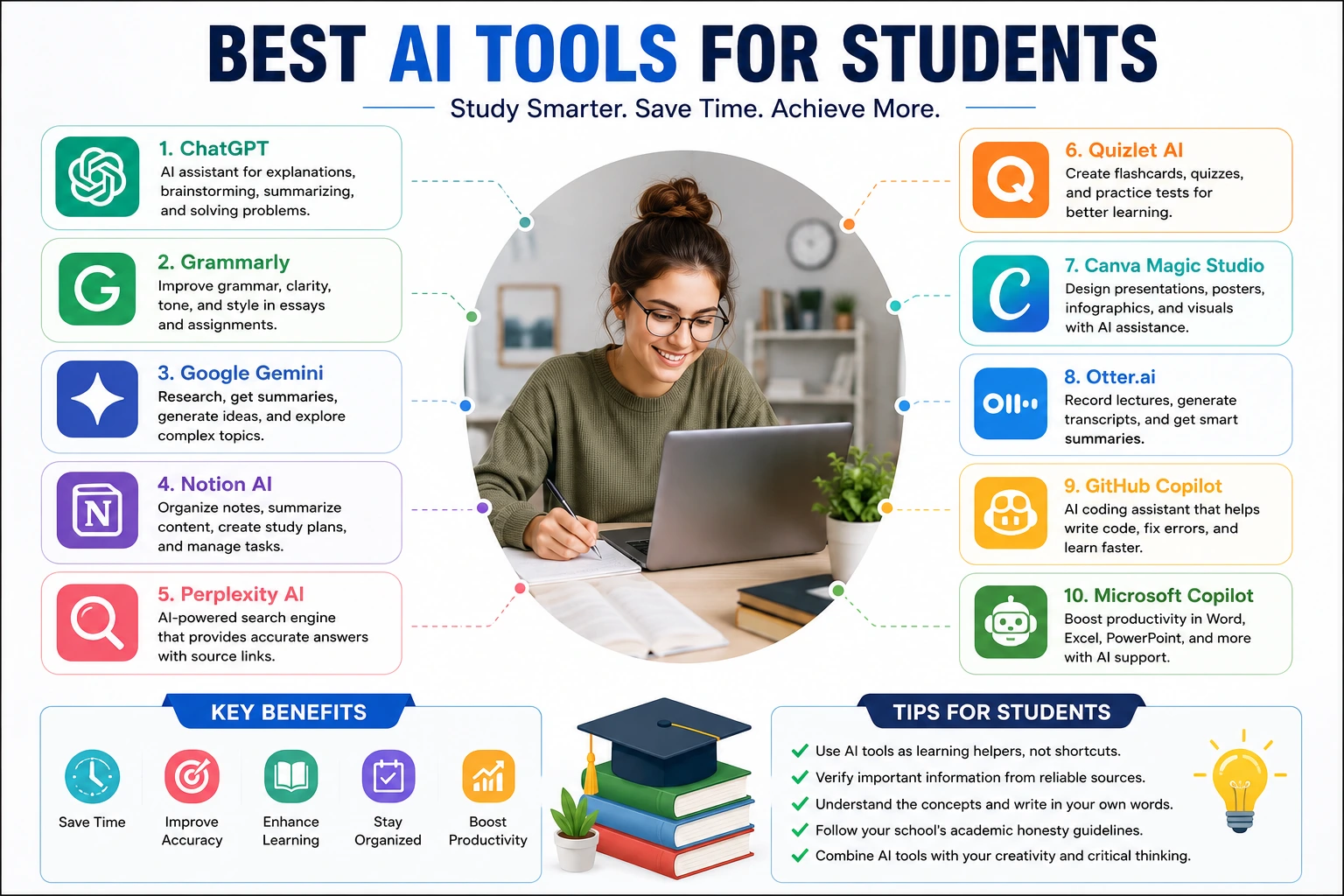
Artificial intelligence (AI) is transforming education by delivering a more personalized, efficient and accessible learning experience. AI-powered tools can help students today with research, writing, note-taking, organizing, learning languages, coding and exam preparation. The best AI tools for students can help with day to day schoolwork and help you be more productive from high school students preparing for college, to college students struggling to stay on top of all their assignments.
But AI should be a learning aid, not a substitute for thinking for yourself. The best students are using AI to help them understand difficult concepts, to organize information and to improve their work, but still developing their own critical thinking and problem solving skills. In this guide, we’ll look at the best AI tools for students, including their key features, benefits, limitations, and tips for responsible use.
Why AI Is Becoming Essential for Students
Our approach to teaching has changed dramatically over the last decade. Digital classrooms, online learning platforms and cloud collaboration tools are now routinely used by schools and universities across the U.S. “AI has added a new layer of innovation that has helped students learn better, do things faster.
Instead of spending hours searching for information, students can use AI tools to summarize difficult topics, explain hard concepts, create study guides, organize notes, or practice language skills. AI can also help with personalized learning by adjusting the explanation to fit different learning styles and academic levels.
AI’s time-saving power is driving its increased popularity in education, where students can spend their time learning, rather than memorizing.
What Makes a Good AI Tool for Students?
Not all of the AI applications are education-specific. The best AI tools for students have several common key characteristics.
A good AI tool should be able to provide accurate information, have an intuitive interface, protect user privacy and encourage learning rather than taking shortcuts. It should be also helpful for students developing their own skills but not to do all tasks automatically.
The capacity to offer features like document summarization, grammar checking, citation assistance, interactive explanations, collaborative tools, and personalized feedback can significantly enhance the learning experience.
When selecting an AI tool, students should also take into account pricing, accessibility, device compatibility and whether the platform offers free educational features.
ChatGPT
And one of the most popular learning assistants is Chatgpt. Students use it to learn new academic concepts, brainstorm, solve practice problems, summarize information, develop study plans, and improve their writing.
ChatGPT can break down topics and explain them step-by-step, rather than just giving answers. This is useful for subjects such as mathematics, science, history, business and computer programming.
Students can utilize ChatGPT to create practice quizzes, review complex lessons, clarify technical jargon, or get ready for interviews and presentations.
ChatGPT is a fantastic learning partner when used responsibly. It encourages understanding rather than just memorization.
Grammarly
Writing assignments are still a big part of education and Grammarly can assist students in improving their grammar, spelling, punctuation, clarity, and writing style.
Grammarly fixes your errors and tells you why the corrections make your writing more readable. This approach to teaching helps students develop as writers over time.
Many students use Grammarly to help them write their essays, research papers, scholarship applications and professional emails.
Its citation support and plagiarism detection also help students produce original work, encouraging academic integrity.
Google Gemini
Google Gemini is a mix of artificial intelligence and Google’s massive search capabilities, so it can be helpful for research and gathering information.
Students can ask questions, summarize articles, brainstorm project ideas, and get explanations on a wide range of academic topics.
With the integration of Gemini and Google’s productivity tools, students can also improve their workflows with Google Docs, Gmail and other educational applications.
This is especially useful for collaborative projects and online learning environments.
Microsoft Copilot
Microsoft Copilot is great for students who often use Microsoft Word, Excel, PowerPoint and OneNote.
Copilot helps you write documents, summarize notes, structure spreadsheets, design presentations and keep track of classroom projects.
Instead of building assignments from scratch, students can create outlines, improve formatting, and receive writing suggestions all while retaining control of the final product.
The fact that it’s built into Microsoft 365 makes it particularly valuable for schools and universities already within Microsoft’s productivity ecosystem.
Notion AI
Organization is so important for academic success and Notion AI helps students organize notes, assignments, research and study schedules.
In a single workspace, students can assemble lecture notes, research materials, make task lists and personalized study plans.
Notion AI is great for planning, and it helps you avoid information overload. This is especially true if you take several courses at once, like many university students.
Its flexible design also makes it convenient to work on group projects.
Perplexity AI
The Perplexity AI tool, with source references, helps students find reliable answers and is especially useful when research requires instant access to credible information.
Perplexity, unlike many traditional AI chatbots, often provides links to supporting material, allowing students to verify information and extend their research.
It promotes responsible academic work and gives users the opportunity to explore topics in more detail.
Students still need to check original sources before using information in assignments.
Quizlet AI
Quizlet AI helps students create flashcards and quizzes, as well as practice difficult concepts using adaptive learning techniques.
Students don’t have to read the textbook over and over. Instead, they are put to the test with their knowledge in interactive learning sessions. This promotes long-term memory retention.
Quizlet remains one of the most popular study platforms for students preparing for exams.
Canva Magic Studio
Visual communication is becoming increasingly important in education, particularly for presentations and creative tasks.
The new Canva Magic Studio enables students to use AI to create presentations, infographics, posters, social media graphics and educational visuals all without advanced design experience.
Students can easily create professional looking class projects and focus more on content than graphic design.
This saves time and enhances the quality of presentation.
Otter.ai
Taking notes in a lecture can be a hard task, especially when the classroom conversation is taking place quickly.
Otter.ai is an app students can use to record lectures and then generate AI-powered transcripts that students can use to review lectures more effectively after class.
Students can focus on understanding the lecture material and refer to the transcripts for review later on. Rather than stressing about taking down everything during the lectures.
This is especially useful for a lot of university students during long lectures and seminars.
GitHub Copilot for Programming Students
Computer science students use GitHub Copilot to enhance their coding skills.
GitHub Copilot does not replace knowledge of programming; it provides code completions, explanations of functions, and debugging support.
It is often used by students who are learning Python, JavaScript, Java, C++ and other programming languages to understand the syntax and solve coding problems more efficiently .
However, it is still important to be able to read and understand the generated code in developing good programming skills.
Benefits of AI Tools for Students

There are benefits to AI in education beyond saving time.
Students can receive personalized explanations that match their learning style, helping them to grasp difficult subjects more easily. AI can also improve your productivity by helping you manage your calendar, summarizing long texts, improving your writing and generating study guides.
Accessibility is another big plus. AI can help students with different learning styles or language backgrounds break down information and enhance comprehension.
Moreover, AI promotes self-directed learning and immediate feedback rather than waiting for the instructor’s response.
Responsible Use of AI in Education
AI has its advantages, but students should use these tools responsibly.
Submitting work that is not your own (e.g. using AI) could be a violation of your school or university’s academic integrity policies. Rather, students should leverage AI to enrich their own learning journey by posing inquiries, examining explanations, and refining their own assignments.
And equally important is the fact-checking. AI systems can sometimes give old or false information.
Even with the most sophisticated technology, the core academic skills – critical thinking, independent analysis and proper citation – remain essential.
How to Choose the Best AI Tool
The best AI tool depends on what your goals are for learning.
Students working on focused papers may find Grammarly or ChatGPT the most helpful, while students managing research projects may prefer Perplexity AI or Google Gemini.
If you’re a student giving presentations, you might want to check out Canva Magic Studio. If you’re a programmer, GitHub Copilot might be more your style.
Instead of using one application, many students utilize a combination of AI tools that form a holistic learning system that supports research, writing, organization and revision.
The Future of AI in Education
Artificial intelligence will keep transforming education in the years to come.
Future AI systems will likely provide more personalized tutoring, adaptive lessons, multilingual learning support and real-time academic feedback.
“We may see more virtual classrooms with AI assistants helping teachers personalize instruction and providing immediate academic assistance to students.
These developments will improve education, but there will still be a need for human educators, because education is a creative, emotionally intelligent, mentoring, critical thinking process that technology cannot fully replace.
Conclusion
Best AI Tools for Students are revolutionizing the way people learn, study and do academic work. Tools like ChatGPT, Grammarly, Google Gemini, Microsoft Copilot, Notion AI, Perplexity AI, Quizlet AI, Canva Magic Studio, Otter.ai, and GitHub Copilot can help you find useful allies for a wide range of educational tasks.
When used well, these tools help students become more productive, organized and confident learners. But the biggest educational benefit comes when you use AI as a learning partner, and not as a shortcut. Students who combine AI support with curiosity, critical thinking and consistent study habits will be better positioned for academic success and future careers in a technology-driven world.